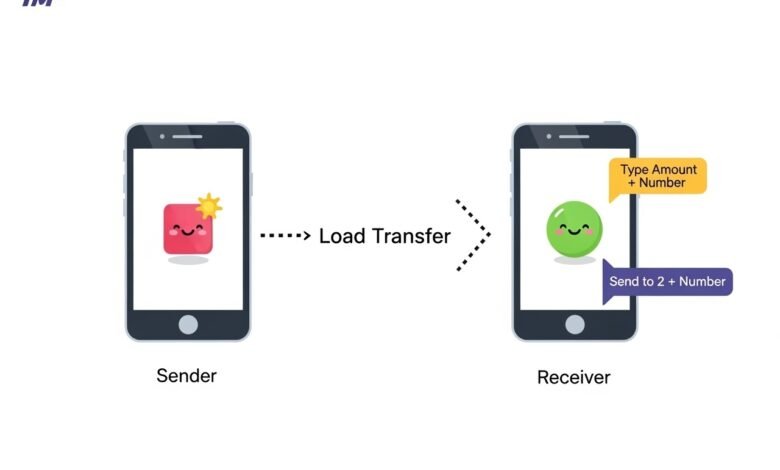
Sharing a load in TM, also known as “pasa load,” is one of the most helpful mobile features in the Philippines. It allows you to send part of your prepaid balance to another TM or Globe user in just a few steps. Many people use this service when they run out of data, need emergency data, or want to help a friend stay connected. It is fast, easy, and useful for daily life. This guide explains everything in a clear and simple way so anyone can follow it, even if you are new to mobile services or sim registration tm rules.
Introduction
Sharing a load in TM is a common and helpful practice. It keeps people connected even when they do not have instant access to a loading station or online payments. TM users can share regular load, promo load, or even data packages. This makes the service flexible and practical for families, friends, and workmates.
In the Philippines, many people depend on prepaid services. Sharing a load gives people a backup plan in times of need. It can help during emergencies, when traveling, or when someone runs out of data right before an important online class or meeting. Because life today relies heavily on communication, knowing how to share a load is valuable.
This article gives you a complete and easy guide. You will learn the meaning of load sharing, the steps to share a load, tips to avoid mistakes, factors that affect load sharing, and why the service matters. All information is written in simple and easy sentences so anyone can understand.
See also: 5 Ways Virtual Staging Increases Buyer Interest Online
Key Concepts and Definitions
Before learning the steps, it is helpful to understand the important words you will see in this guide. These terms will make things clear and easy to follow.
Load
Load is the prepaid balance on your mobile number. It is used for calls, texts, mobile data, and promos.
Load Sharing
Load sharing is a service that allows a TM user to transfer part of their load to another TM or Globe number. The amount is deducted from the sender’s balance and added to the receiver’s balance.
Pasa Load
This is the common name for load sharing in the Philippines. “Pasa” means “to pass” or “to give.” So, pasa load means giving load to another mobile number.
Recipient
The person who receives the load. The recipient must also have a registered TM or Globe SIM and an active account.
Sender
The person who sends the load. The sender must have enough load to share, plus a small fee.
Confirmation Code
A code sent by TM to the sender to confirm the transaction. It ensures that the load is sent only by the owner of the number.
Main Discussion
This section explains everything you need to know about sharing a load in TM. It includes the steps, options, examples, and common issues users face.
How to Share a Load in TM:
Sharing a load in TM is very easy. You can do it through text or the GlobeOne app. Many users still choose text because it works even without mobile data.
1. Share Load Through SMS (Text Message)
Follow these steps:
- Open your messaging app.
- Type this format:
Amount<space>Receiver’s Number
Example:
20 09151234567 - Send the message to 2 + the recipient’s number.
Example:
Send to 209151234567 - You will receive a confirmation message.
- Reply YES to confirm.
- You and the receiver will get a text confirming the load transfer.
This method works for both small and large load amounts. It is fast and only takes a few seconds.
2. Share Load Through the GlobeOne App
If you have data or Wi-Fi, this is easier and safer.
- Open the GlobeOne App.
- Log in with your mobile number.
- Go to the “Rewards & Offers” or “Share Load” section.
- Enter the amount you want to send.
- Enter the receiver’s number.
- Tap “Send” and confirm the transaction.
This option shows your balance and keeps a record of all your load-sharing activities.
Common Problems When Sharing Load
Even though sharing the load is simple, some users still face issues. Here are the most common problems and what they mean:
1. Not Enough Balance
The sender must have the amount they want to share plus a small fee. If they do not, the transfer will not push through.
2. Wrong Number
If the sender types the wrong number, the load will go to someone else. Always double-check before sending.
3. Inactive or Unregistered SIM
The recipient must have an active and registered SIM card. If their SIM is not registered, they cannot receive a load.
4. System Delay
Sometimes there are network delays. If this happens, wait a few minutes and check your balance again.
5. Promo Restrictions
Some promos cannot be shared. Only regular load and selected promos can be transferred.
How Much Load Can You Share?
TM allows users to share small or large amounts depending on the promo rules. Common values include:
- ₱5
- ₱10
- ₱15
- ₱20
- ₱30
- ₱50
- ₱100
Some promos and data packages also allow sharing, but only if they are part of the Load or Pasa Promo service.
How Much Is the Fee?
In most cases, TM charges a small fee for sending a load. The fee is deducted from your balance, so make sure you have extra load before sending.
Factors Influencing Load Sharing in TM
Many things affect how easy or successful load sharing will be. Understanding these factors can help you avoid problems.
1. Network Condition
Network strength matters. A poor network signal can delay or stop the transfer.
2. SIM Registration Status
Only users with registered SIM cards can send or receive load. This rule helps secure mobile accounts.
3. Promo Type
Some promos allow sharing, while others do not. Regular load is the most flexible option.
4. Phone Compatibility
Any mobile phone can share a load as long as it can send text messages. Even old phones work well.
5. Account Limits
There may be limits on how much load you can share per day or per transaction.
6. Time of Day
During peak hours, load sharing may slow down due to heavy network traffic.
Benefits and Importance of Load Sharing
Load sharing is more than just a helpful feature. It brings many benefits to TM users.
1. Emergency Support
If someone runs out of load during an emergency, a friend or family member can send load instantly.
2. Helps Students and Workers
Students who need mobile data for online classes or research can receive load easily. Workers who rely on mobile communication also benefit.
3. Saves Time and Money
You do not need to go to a loading station. You can get a load anytime and anywhere.
4. Easy for Families
Parents often send loads to children for school. Siblings help each other stay connected. It builds a support system.
5. Makes Communication Possible
Load sharing helps people stay in touch even in remote areas where stores are far away.
6. Flexible Use
The receiver can use the load for calls, texts, or data. They can also register for promos.
Tips and Best Practices for Sharing Load in TM
To make your load-sharing experience smooth and safe, follow these simple tips:
1. Always Check the Number
Make sure you type the correct number before sending. One wrong digit can send your load to the wrong person.
2. Keep Your SIM Registered
Only registered SIMs can do secure transactions. Always keep your SIM registration updated.
3. Maintain Enough Balance
Have an extra load for fees. This prevents failed transactions.
4. Save Important Numbers
Save the number of people you often send loads to. This reduces mistakes.
5. Confirm the Transfer
Wait for the confirmation message before assuming the load has been sent.
6. Use GlobeOne for Better Control
If you want a record of your transactions, the GlobeOne app is the best choice.
7. Be Careful With Sharing
Send load only to trusted people to avoid scams or misuse.
Conclusion
Sharing a load in TM is simple, helpful, and important for everyday communication. It allows users to help one another during emergencies, stay connected, and manage mobile costs wisely. Understanding the steps, the factors that affect load sharing, and the best practices will make the process smooth and trouble-free.
Whether you share load using SMS or the GlobeOne app, the key is to follow the format correctly and always double-check the details. Load sharing builds support, strengthens communication, and gives users a convenient backup option anytime they need it. With this complete and easy guide, you now know how to share a load in TM confidently and safely.